components/editor
Motion curve editor.

Submodules
components/editor/drawer
Curve drawing and editing.
- drawer.sorted_numbers(arr)
Sort number array the right way. Will not work for Infinity and Nan values.
- Arguments
arr (
array()) – Input array.
- Returns
array – Sorted copy of array.
Examples:
// returns actually [0, 1, 2, 3, 8, 9, 10]
sorted_numbers([10, 9, 8, 3, 2, 1, 0])
- class Grid(abs_tol=0.001)
Data container for snapping positions to horizontal grid (snap to grid feature).
- Arguments
abs_tol (
number()) – Absolute tolerance.
- Grid._snap_y_value(y)
Snap y value to grid.
- Arguments
y (
number()) – Horizontal value to snap.
- Returns
number – Snapped y value.
- Grid.add_y_value(y)
Add y value to grid.
- Grid.clear()
Clear grid values.
- Grid.remove_y_value(y)
Remove y value from grid.
- Grid.snap_point(pt)
Snap point to grid.
- Arguments
pt (
array()) – 2D point.
- Returns
array – Snapped 2D point.
- class Annotation(drawer)
Annotation wrapper. Manages single HTML span element for overlaying informations while dragging.
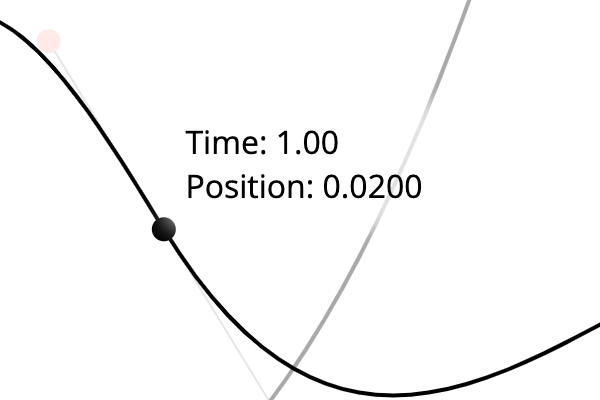
Annotation shows the current time / position value when dragging a knot. When dragging a control point it will show the derivative at the adjacent knot instead.
- Arguments
drawer (
Drawer()) – Parent drawer instance.
- Annotation.annotate(text)
Set inner HTML of annotation label.
- Arguments
text (
string()) – Annotation text.
- Annotation.hide()
Hide annotation.
- Annotation.move(pos, offset=10)
Move annotate label around.
- Arguments
pos (
array()) – Position to move to (data space).offset (
number()) – Offset value.
- Annotation.show()
Show annotation.
- class Selection()
Data container for selected knot indices.
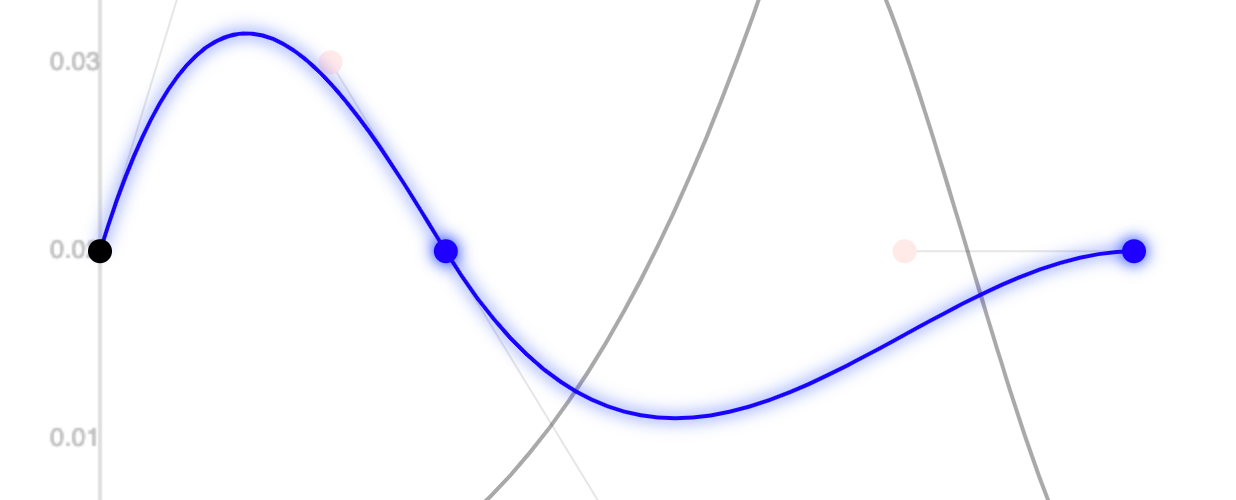
Knot numbers 1 and 2 are both selected.
- Selection.deselect(nr)
Deselect number.
- Arguments
nr (
number()) – Number to deselect.
- Returns
boolean – If selection has changed.
- Selection.deselect_all()
Clear selection.
- Returns
boolean – If selection has changed.
- Selection.is_empty()
If nothing is selected.
- Returns
boolean – If nothing is selected.
- Selection.is_selected(nr)
Check if number is selected.
- Arguments
nr (
number()) – Number to check.
- Returns
boolean – If number is selected.
- Selection.select(nr)
Select new number.
- Arguments
nr (
number()) – Number to select.
- Returns
boolean – If selection has changed.
- Selection.sorted()
Get frozen sorted selection.
- Returns
array – Sorted array copy of selection.
- class SelectionRectangle(drawer)
Selection rectangle wrapper. Manages the blue shimmering selection box which can be drawn with the mouse.
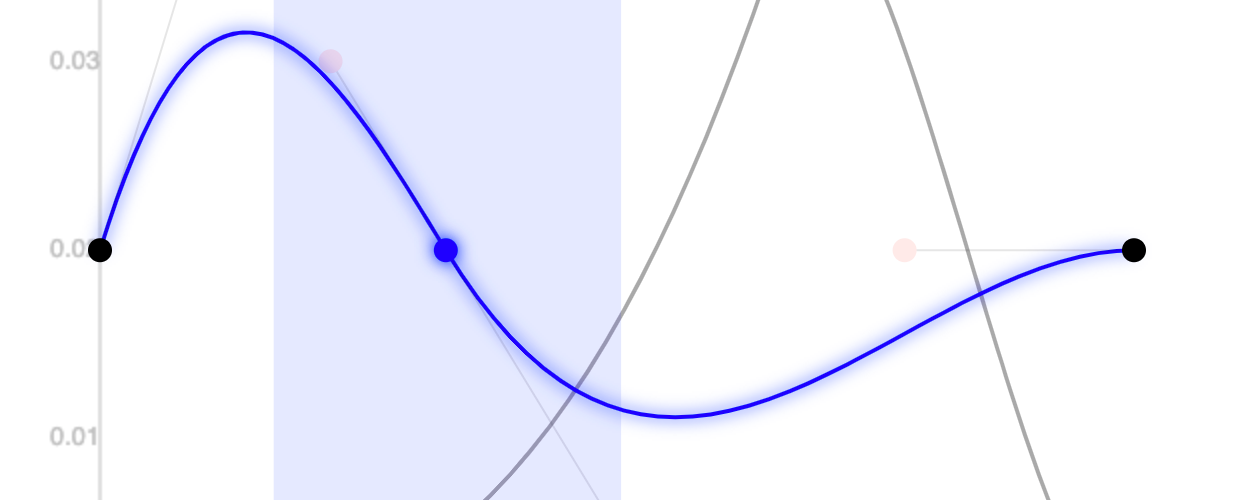
Active selection rectangle.
- Arguments
drawer (
Drawer()) – Parent drawer instance.
- SelectionRectangle.hide()
Hide selection box rectangle.
- SelectionRectangle.move(left, right)
Move selection box.
- Arguments
left (
number()) – Left side of selection box in data space coordinates.right (
number()) – Right side of selection box in data space coordinates.
- SelectionRectangle.show()
Show selection box rectangle.
- class Drawer()
Curve drawer widget web component. Based on simple value plotter adds curve drawing and editing functionalities.
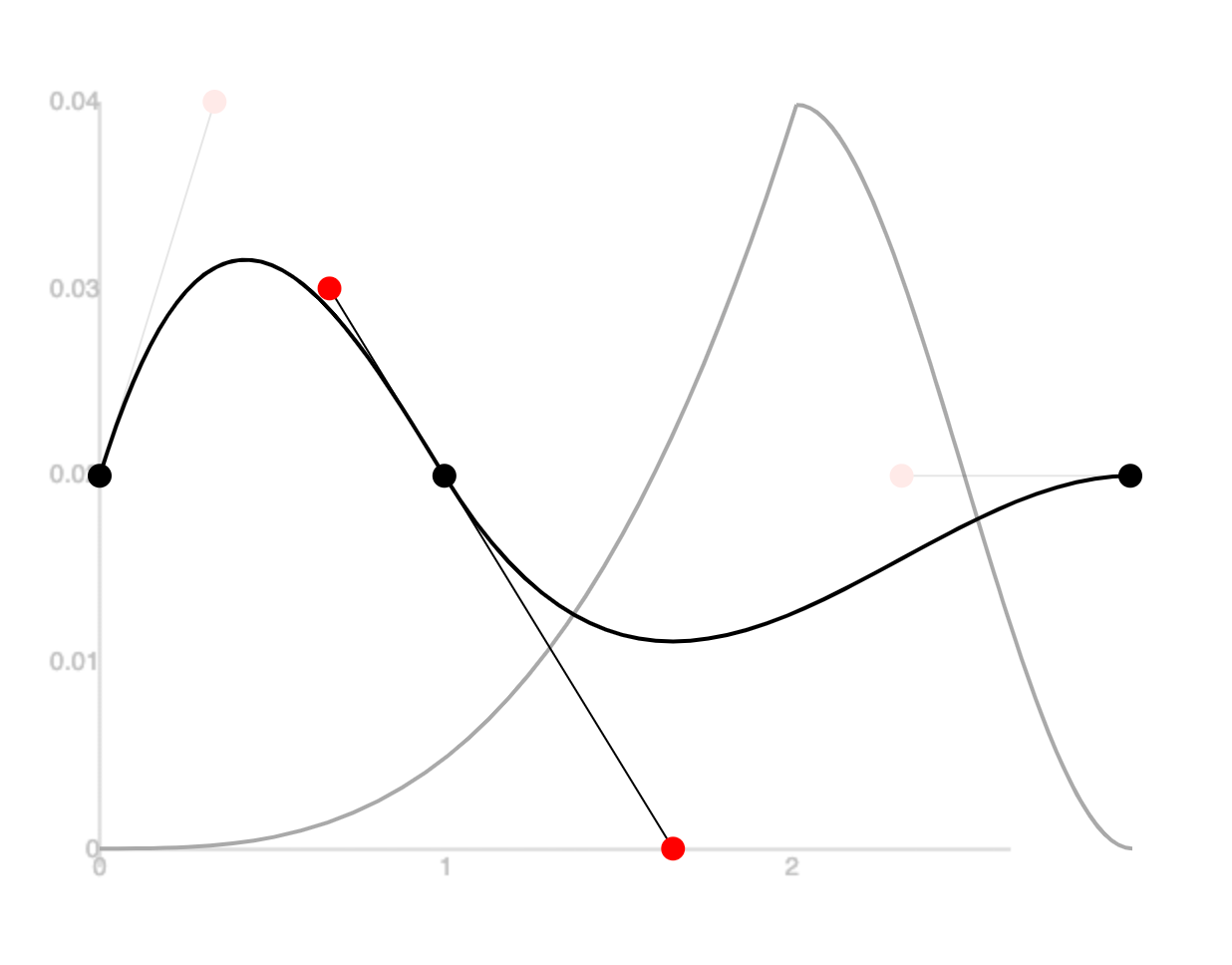
Two splines are plotted. For the foreground spline the black circles are the knots and the red ones the control points. The thin helper lines indicate the slope. Knots and control points can be dragged around.
Key features:
Foreground / background curves.
Drag mouse motions
Snapping to grid.
Multiple knot selection.
Drag navigation.
The plotter base class is used to plot the actual values of the motors behind the curves.
Emits the following custom events:
curvechangingwhen the foreground curve starts to change because of user input.curvechangedwhen the user is done with editing the curve.channelchangedwhen the user clicked on a background curve spline.
- Drawer.clear()
Clear foreground curve and SVG elements but remember selection.
- Drawer.clear_and_forget()
Same as clear() but also forget selection.
- Drawer.click_select_knots(knotNumbers, shiftKey)
Process click on selected element:
If already selected continue
If not selected:
Without shift key: Overwrite selection
With shift key: Add to selection.
- Arguments
knotNumbers (
array()) – Knot numbers which got clicked.shiftKey (
boolean()) – If shift key was held.
- Drawer.create_svg_circle(data_source, radius)
Initialize an SVG circle element and adds it to the SVG parent element. data_source callback needs to deliver the center point of the circle.
- Arguments
data_source (
function()) – Callable data source returning the center point.radius (
number()) – Circle radius.
- Returns
SVGCircleElement – SVG circle element.
- Drawer.create_svg_line(data_source)
Initialize an SVG line element and adds it to the SVG parent element. data_source callback needs to deliver the start end and point of the line.
- Arguments
data_source (
function()) – Callable data source which spits out the current start and end point of the line.
- Returns
SVGLineElement – SVG line instance.
- Drawer.create_svg_path(data_source)
Initialize an SVG path element and adds it to the SVG parent element. data_source callback needs to deliver the 2-4 Bézier control points.
- Arguments
data_source (
function()) – Callable data source returning the control points.
- Returns
SVGPathElement – SVG path element.
- Drawer.draw()
Draw everything.
- Drawer.draw_background_curve(curve)
Draw background curve.
- Arguments
curve (
Curve()) – Background curve to draw.
- Drawer.draw_foreground_curve(curve, channel=-1)
Draw foreground curve. Selected channel will be interactive.
- Arguments
curve (
Curve()) – Foreground curve to draw.channel (
number()) – Foreground curve to draw. None by default.
- Drawer.draw_svg()
Draw / update all SVG elements.
- Drawer.emit_channel_changed(channel)
Emit custom channelchanged event. When user clicks on another channel of the foreground curve.
- Arguments
channel (
number()) – Channel number.
- Drawer.emit_curve_changed(newCurve)
Emit custom curvechanged event.
- Arguments
newCurve (
Curve()) – New final curve.
- Drawer.emit_curve_changing(position=null)
Emit custom curvechanging event.
- Arguments
position (
array()) – Optional position value to trigger live preview.
- Drawer.forget_selection()
Forget everything selected.
- Drawer.make_draggable(ele, curve, channel, callbacks)
Make something draggable inside data space. Wraps default make_draggable function. Handles mouse -> image space -> data space transformation, calculates delta offset, triggers redraws. Mostly used to drag SVG elements around.
- Arguments
ele (
SVGElement()) – Element to make draggable.curve (
Curve()) – working copy of the curve.channel (
number()) – Active curve channel number.callbacks (
object()) – Drag event callbacks (start_drag, drag, end_drag).
- Drawer.move_selected_knots(offset, snap=false)
Move all selected knots by some offset.
Drawer.remember_selected_knot_positions()has to be called before!- Arguments
offset (
number()) – Horizontal offset.snap (
boolean()) – Snap to grid.
- Drawer.plot_control_point(curve, channel)
Plot interactive control points with helper lines of spline.
- Arguments
curve (
Curve()) – Curve to draw control points / helper lines for.channel (
number()) – Active curve channel number.
- Returns
SVGGroupElement – Group containing all control point elements.
- Drawer.plot_curve_channel(curve, channel, className, radius=6)
Plot single curve channel.
- Arguments
curve (
Curve()) – Curve to plot.channel (
number()) – Active curve channel number.className (
string()) – CSS class name to assign to path.radius (
number()) – Circle radius.
- Drawer.plot_curve_path(curve, channel, className)
Plot spline path of curve. This is non-interactive.
- Arguments
curve (
Curve()) – Curve to draw path for.channel (
number()) – Active curve channel number.className (
string()) – CSS class name to assigne to path.
- Drawer.plot_knot(curve, channel, knotNr, radius)
Plot interactive spline knots.
- Arguments
curve (
Curve()) – Curve to draw knots from.channel (
number()) – Active curve channel number.knotNr (
number()) – Knot number.radius (
number()) – Radius of knot circle.
- Returns
SVGCircleElement – Circle knot.
- Drawer.remember_selected_knot_positions()
Remember current knot positions of working copy. Necessary to then move the knots around.
- Drawer.remove_knots(curve, channel, knotNumbers)
Remove knots from curve channel spline.
- Arguments
curve (
Curve()) – Curve in question.channel (
number()) – Spline number.knotNumbers (
array()) – Knot indices to remove.
- Drawer.setup_global_svg_drag_listeners()
Setup drag handlers for SVG. Either:
Draw selection rectangle box
Navigate viewport. Horizontal shifts / vertical zooms around middle focal point.
- Drawer.setup_keyboard_shortcuts()
Setup global key event listeners.
- Drawer.update_selected_elements()
Update selection styling for foreground elements.
components/editor/editor
Curve editor.
- editor.dont_display_select_when_no_options(select)
Do not show select when there is only 1x option.
- Arguments
select (
HTMLElement()) – HTML select element.
- class Editor()
Motion editor.
This widget holds two web components:
<being-list>for showing the current content.<being-drawer>for plotting and displaying curves.
What this class does:
Toolbar
Most of API connections.
One independent editing history per curve
Relaying the actual position values of the motors to the drawer.
Trajectory recording.
What else there is:
Transport handles the playback line and timestamp calculations.
Motion player select controls on which motion player the current curve is played.
Channel select controls the foreground channel / spline of the curve.
- Editor.history
type: History
Get editing history for the currently selected curve.
- Editor.assign_channel_names()
Assign channels names. Take motor names if possible. Excess channels will be labeled with “Curve X”…
- Editor.assure_limits()
Activate drawing limits from selected motion player.
- Editor.confirm_unsaved_changes()
Check if there are unsaved changes and get confirmation of the user to proceed.
- Returns
boolean – If it is ok to proceed with unsaved changes.
- Editor.create_new_curve()
Create a new curve.
- Editor.curve_action(func)
Curve action decorator. Decorates methods that accept an event an return a new modified curve.
- Arguments
func (
function()) – Curve action function to decorate.
- Returns
function – Decorated func.
- Editor.curve_changed(newCurve)
Notify editor that the curve changed. That there is a new state of the curve.
- Arguments
newCurve (
Curve()) – New curve state.
- Editor.curve_changing(position=null)
Notify spline editor that the spline working copy is going to change. Also supply a optional [x, y] position value for the live preview feature (if enabled).
- Arguments
position (
array|null()) – Optional position array. If live preview is selected the y component will be send to the backend.
- Editor.delete_current_curve()
Delete current curve.
- Editor.draw_current_curves()
(Re)-draw selected curve from history state.
- Editor.draw_curve(name, curve)
Draw a fresh curve. Name has to be provided for initialization of corresponding history.
- Arguments
name (
string()) – Curve name.curve (
Curve()) – Curve instance to draw..
- Editor.duplicate_current_curve()
Duplicate current curve.
- Editor.has_motion_players()
Do we have at least one motion player?
- Returns
boolean – There is one.
- Editor.new_behavior_message(behavior)
Process new behavior message from backend.
- Arguments
behavior (
object()) – Behavior message.
- Editor.new_data(msg)
Process new data message from backend.
- Arguments
msg (
object()) – Being state message.
- Editor.new_motions_message(msg)
Process new motions / content message.
- Arguments
msg (
object()) – Content changed message.
- Editor.no_limits()
Deactivate drawing limits.
- Editor.number_of_channels()
Current number of curves.
- Returns
number – Number of channels.
- Editor.play_current_motions()
Start playback of current spline in back end.
- Editor.populate(curvenames)
Populate with content.
- Arguments
curvenames (
array()) – Ordered [name, curve] entries.
- Editor.redo()
Redo latest editing step.
- Editor.save_current_curve()
Save current working copy of selected curve.
- Editor.select_channel(channel)
Select another channel.
- Arguments
channel (
number()) – Channel number to select.
- Editor.select_motion_player(motionPlayer)
Select (another) motion player.
- Arguments
motionPlayer (
object()) – Motion player to select (object representation).
- Editor.selected_channel()
Currently selected channel number.
- Returns
number – Channel number.
- Editor.set_notification_center(notificationCenter)
Register notification center so that editor can publish notifications to the user.
- Arguments
notificationCenter (
NotificationCenter()) – Running notification center.
- Editor.setup_channel_select()
Setup curve channel select.
- Editor.setup_curve_list()
Setup curve list and wire it up.
- Editor.setup_keyboard_shortcuts()
Register key event listeners for keyboard shortcuts.
- Editor.setup_motion_player_select()
Populate motion player select and determine currently selected motion player.
- Editor.setup_toolbar_elements()
Populate toolbar with buttons and motion planner / motor selections. Wire up event listeners.
- Editor.start_recording()
Start recording trajectory. Disables motors in back end.
- Editor.stop_motion_playback()
Stop all spline playback in back end.
- Editor.stop_recording()
Stop trajectory recording, re-enable motors and fit smoothing spline through trajectory via back end.
- Editor.toggle_c1()
Toggle c1 continuity in drawer.
- Editor.toggle_limits()
Toggle limiting curve control points for the given motion player / motors. TODO: This has to be changed if the motion player changes!
- Editor.toggle_motion_playback()
Toggle spline playback of current spline.
- Editor.toggle_recording()
Toggle trajectory recording.
- Editor.toggle_snap_to_grid()
Toggle snapping to grid inside drawer.
- Editor.undo()
Undo latest editing step.
- Editor.update_channel_select(nChannels)
Set number of options in channel select.
- Arguments
nChannels (
number()) – Desired number of channels.
- Editor.update_motion_player_selection()
Update currently selected motion player, output indices.
- Editor.update_plotting_lines()
Update the currently plotted lines by adjusting the output indices.
- Editor.update_ui()
Update UI elements. Mostly button and select elements related at this point (enabling / disabling buttons, updating channel names).
components/editor/list
Spline / motion list for editor.
- list.as_curve(obj)
Assure object as Curve.
- Arguments
obj (
object|Curve()) – Input object.
- Returns
Curve – Curve instance.
- class List()
Curve / content list web component.
Lists all available curves in backend. Allows for selecting, renaming, creating and erasing curves.
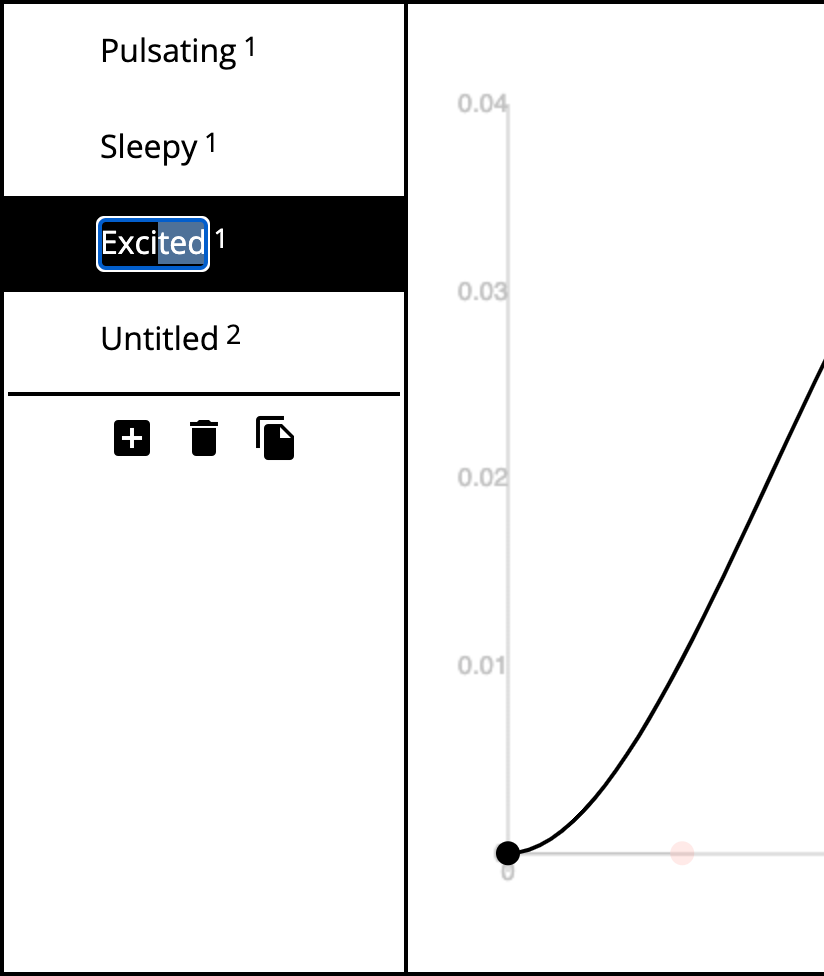
Available curves in backend. Click to select and double click to rename. Ordered by last modified.
Manages the curve to motion player association (remembering which motion player belongs to which curve when clicking on one) and which curves are armed for playback for each motion player.
Emits the following custom events:
selectedchangedwhen the selected curve changed.armedchangedwhen the arming changed.
- List.add_entry(name, curve)
Add new curve entry to list.
- Arguments
name (
string()) – Curve name.curve (
Curve()) – Actual curve.
- List.arm(name, publish=true)
Arm a curve.
- Arguments
name (
string()) – Curve name.publish (
boolean()) – If to emit armedchanged event.
- List.associate_motion_player(name, motionPlayer)
Associate curve with motion player.
- Arguments
name (
string()) – Curve name.motionPlayer (
object()) – Motion player object.
- List.associated_motion_player(name)
Get associated motion player for curve (if any).
- Arguments
name (
string()) – Curve name.
- Returns
object|undefined – Associated motion player object.
- List.attache_event_listeners_to_entry(entry)
Attache necessary event listeners to list entry.
Clicking for select
Toggle eye symbol for arming
Double clicking for renaming.
- Arguments
entry (
HTMLLIElement()) – List entry.
- List.background_curves()
Get an array with all background curves. These are curves which are armed but not the selected one.
- Returns
array – All background curves.
- List.create_entry(name, curve)
Create new list curve entry.
- Arguments
name (
string()) – Curve name.curve (
Curve()) – Actual curve.
- Returns
HTMLLIElement – New list entry element.
- List.deselect(name, publish=true)
Deselect curve. This also disarms the curve.
- Arguments
name (
string()) – Curve name.publish (
boolean()) – If to emit selectedchanged event.
- List.disarm(name, publish=true)
Disarm curve.
- Arguments
name (
string()) – Curve name.publish (
boolean()) – If to emit armedchanged event.
- List.disassociate_motion_player(name)
Disassociate curve from motion player.
- Arguments
name (
string()) – Curve name.
- List.emit_custom_event(typeArg)
Emit a custom event for given event type from this element.
- Arguments
typeArg (
string()) – Event type name.
- List.first_best_motion_player(name)
Get first best match for curve. Associated or the first known motion player.
- Arguments
name (
string()) – Curve name.
- Returns
object|undefined – Associated motion player object.
- List.has_association(name)
Do we have an motion player association for a given curve?
- Arguments
name (
string()) – Curve name.
- Returns
boolean – If association present.
- List.is_armed(name)
Check if curve is armed.
- Arguments
name (
string()) – Curve name.
- Returns
boolean – Armed state.
- List.new_motions_message(msg)
Process new content / motions message. Purge the currently displayed curves.
- Arguments
msg (
object()) – Content changed message.
- List.populate(namecurves)
Populate curve list with entries. Discard all the olds.
- Arguments
namecurves (
array()) – Array of ordered [name, curve] entries.
- List.rename_curve(oldName, newName)
Rename curve in curve list data.
- Arguments
oldName (
string()) – Old curve name.newName (
string()) – New curve name.
- List.select(name, publish=true)
Select curve. This also arms the curve.
- Arguments
name (
string()) – Curve name.publish (
boolean()) – If to emit selectedchanged event.
- List.selected_curve()
Get the currently selected curve (if any). undefined otherwise.
- Returns
Curve|undefined – Selected curve.
- List.update_ui()
Update UI from current state.
- List.validate_name(name)
Filename validator. Trims white space and checks validity for filename usage. Throws error otherwise. Compatible with make_editable() function.
- Arguments
name (
string()) – Name to validate.
- Throws
InvalidName()–- Returns
string – Validated name.
components/editor/transport
Playback transport state.
- PAUSED
type: string
Paused state.
- PLAYING
type: string
Playing state.
- RECORDING
type: string
Recording state.
- class Transport(looping=true)
Transport / playback cursor container. Current playing position, duration, looping, playing, cursor drawing.
- Arguments
looping (
boolean()) – Initial looping state.
- Transport.paused
type: boolean
Is paused.
- Transport.playing
type: boolean
Is playing.
- Transport.recording
type: boolean
Is recording.
- Transport._change_state(newState)
Change transport state (but only if valid transitions).
- Arguments
newState (
string()) – New state.
- Transport._init_cursor()
Initialize cursor SVG line.
- Transport.draw_cursor()
Draw SVG cursor line (update its attributes).
- Transport.move(timestamp)
Update transport position and map timestamp to curve duration.
- Arguments
timestamp (
number()) – New timestamp value.
- Returns
number – Playing position.
- Transport.pause()
Pause transport.
- Transport.play()
Start playing transport.
- Transport.record()
Start recording transport.
- Transport.rewind()
Rewind cursor to the beginning.
- Transport.stop()
Stop transport.
- Transport.toggle_looping()
Toggle looping.